


It’s June 8, 2026—the day of WWDC, Apple’s developer conference—and Tim Cook’s final major keynote. Starting at 6:45 p.m., we’ll begin updating this article step by step with all the latest information on Apple’s new software. All software versions have the version number 27.
Last updated: June 12, 2026 – 6:30p.m. (Final Version)
iOS:
iOS 27 will continue to be compatible with the iPhone 11 and later models. This means it supports all devices that were already supported by iOS 26. Apple has also improved the search index. Family Sharing and screen protection features, including parental controls, have been expanded and can be customized more specifically for parents. The new Kids Account has been redesigned and enhanced in terms of functionality; existing accounts can be converted to the new Kids Account. Parents can now specify exactly which apps children are allowed to use and customize these settings individually. This also applies to individual websites; children can now request access to websites from their parents. The Screen Time feature is being expanded to include videos and depictions of violence across all apps. “Time Allowance” offers new categories: Entertainment, Games, and Social Media. Parents can use time windows to restrict when specific apps are available and view Screen Time details in detail. These features are available in iOS, iPadOS, and macOS. Siri AI is being integrated directly into the Camera app to ask questions about live scenes.
Safari can now organize tabs into groups by topic while you’re browsing. Safari can actively monitor websites for changes using notifications to alert you when, for example, prices change. With the help of Siri AI, you can now create a Safari extension. This allows you to customize the color scheme of websites, for example. The Passwords app detects weak passwords, can log in to the affected accounts, change the password to a secure one, and save it in the app. Siri AI can also provide important information from emails and chats that is needed during a phone call; this integrates Siri AI into the Phone app as well. Videos taken with the Home app are now automatically grouped together so that the context is immediately clear. Additionally, 4K resolution is now supported. Shortcuts can now be described in natural language to create them; there’s no need for a cumbersome setup. Image Playground can now create real photos—the 90s clip art era is over. Individual elements in Image Playground photos can be adjusted directly without having to completely regenerate the photo. However, there are limitations when generating „realistic“ photos. While this feature is available for free, it is subject to daily limits for non-iCloud+ customers.
Photo editing features for removing content have been improved. Photo cropping has also been optimized. Spatial Reframing now lets you change the perspective in photos to better focus on people and objects. These new tools also work with older photos and photos not taken with an iPhone. All of these features are available in a new “Tools” tab in the Photos app. These features will also be available directly in the European Union. The settings for the Photos app have been significantly streamlined and reorganized to provide a clearer overview.
The volume of the alarm can now be adjusted individually for each alarm. This also applies to alerts and system sounds. All three settings are now independent of the ringtone volume control if you enable this option in the settings. Widgets now have a new size option: „Super-large.“ The flight simulation in Apple Maps now uses satellite imagery combined with AI to generate flight simulations. The equalizer for AirPods can now be customized more precisely. There is also a new „Appearance“ menu item in Settings. This is where various appearance settings for iOS 27 are grouped. In the Home Screen settings, you can now use a button to move the clock to a bar at the top of the screen. In addition, you can now close the music player from the lock screen. In the Weather app, you can now switch directly between temperature, precipitation, and wind in the forecast, and the data is displayed with units of measurement. In the Messages app, there is now a more intuitive progress bar within the chat window. In the keyboard settings, there is a new toggle for Genmoji suggestions on the keyboard. In the Date & Time settings, you can now set the time zone more precisely to a specific city. In the Health app, the search function is now called „Discover.“ The Preview app now features a new magnifying glass.
The top toolbar in the Camera app has been redesigned. The icons are now slightly smaller and less distracting. New buttons have been added to the submenu, including the grid, the level, and the file format indicator.
In the „FindMy“ app, you can now set much more precisely (by hour, minute, and date) how long the device’s location should be shared with a person.
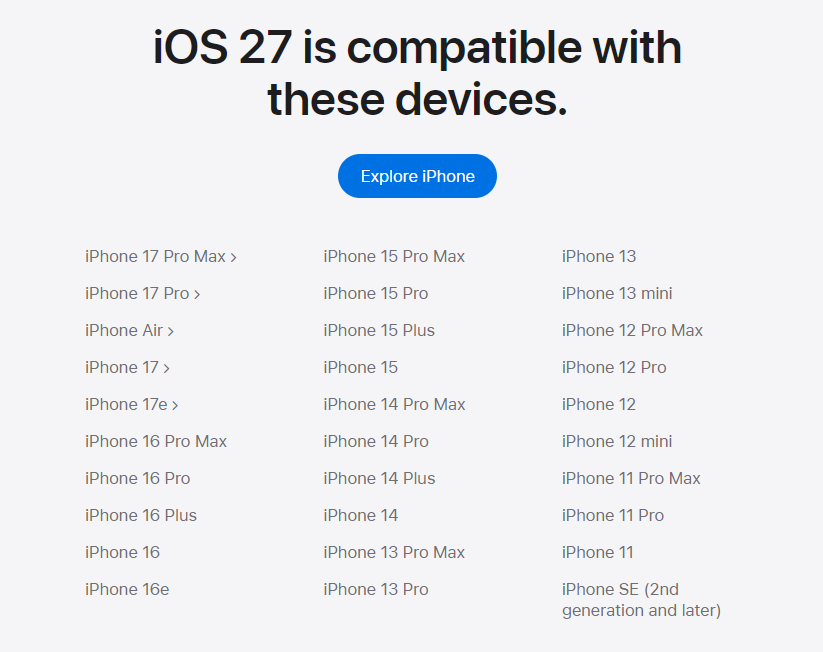
Photo: Apple
iPadOS:
iPadOS 27 will be available on all devices that supported iPadOS 26. You can now create folders in the Freeform app on the iPad. The Freeform app now also has a dark mode. The „Close Other Tabs“ feature has also returned to Safari on the iPad. Open apps now display their names at the top of the menu bar. There’s a feature behind this as well. If you click on the app’s name, the entire menu bar for that app expands. When editing the Home screen, there is now an „Undo“ button at the top of the menu bar. The slideshow feature in the Photos app now includes new design options for image transitions. There will also be improvements to how iPhone apps that aren’t optimized for the iPad are displayed.
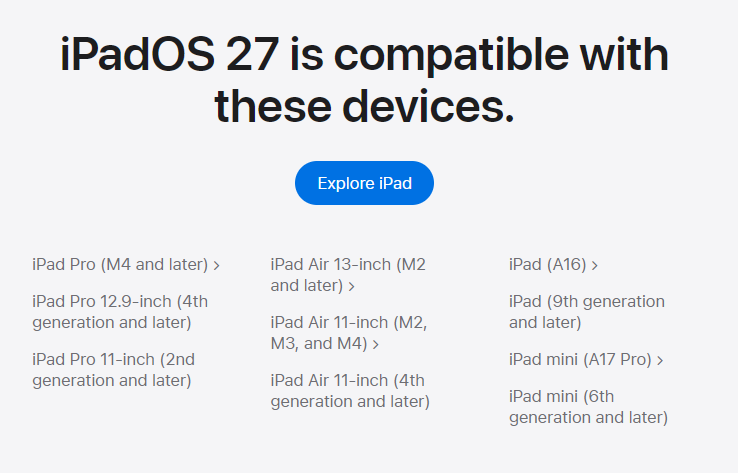
Photo: Apple
MacOS:
The new macOS is called „macOS Golden Gate.“ The new Siri AI is integrated directly into Spotlight Search, making it accessible from anywhere in macOS. Siri AI is also integrated into the context menu, allowing you to, for example, compare multiple files and ask questions about those documents. Even grammatical errors are correctly interpreted by Siri and result in accurate answers. Siri can also access emails directly and compose replies. The writing tools have been improved. Siri AI can now respond to people using the same wording you would use when speaking to them in person. A new network icon for cable usage has been added to the menu bar. Apps now feature an indicator that makes it easier for users to see when an app is still open. This is indicated by a light gray dot beneath the app icon in the Dock.
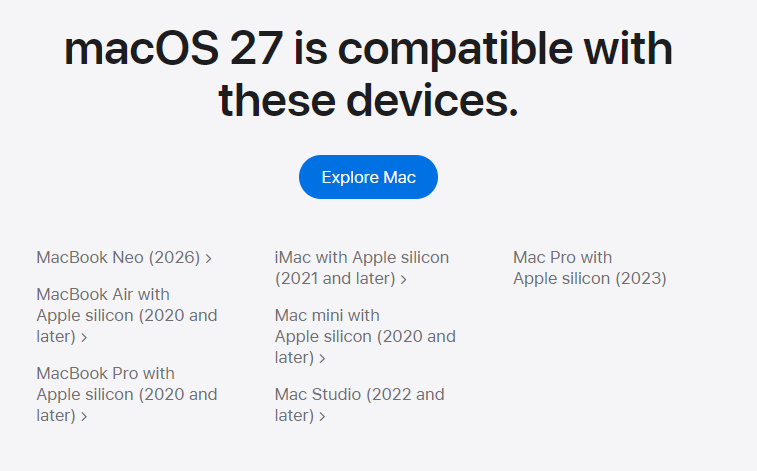
Photo: Apple
watchOS:
The new Siri AI will also be available on watchOS. watchOS 27 introduces one-handed gesture control. This allows you to execute a command on the Apple Watch with a single hand gesture. The FindMy app has also been consolidated on the Apple Watch. Previously, there were multiple instances of the app, depending on how many devices were connected for tracking. watchOS 27 will no longer be available for the Apple Watch Series 8 and earlier models, nor for the Apple Watch Ultra 1. Apple had previously announced that the Apple Watch Series 9 would also be excluded. This decision has now been reversed, as the Series 9 uses the same processor as the Apple Watch Ultra 2.
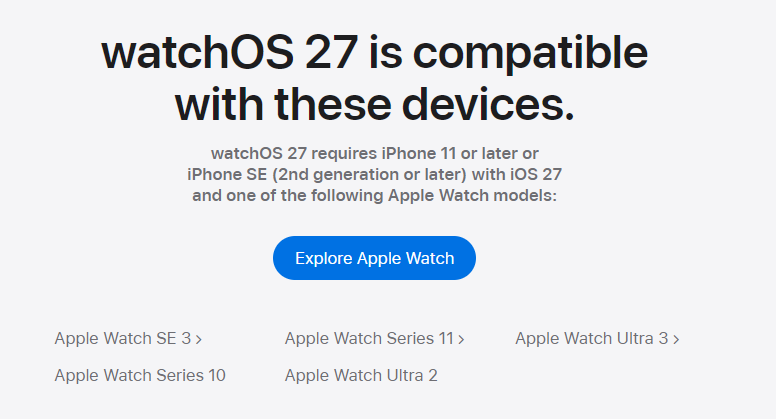
Photo: Apple
visionOS:
Panoramic photos can now be converted into visionPro videos. The Siri AI app can be activated by looking at the app.
tvOS and homeOS:
There was no mention of tvOS or homeOS in the keynote or on Apple’s operating system websites. However, it is now known that the Apple TV HD and the Apple TV 4K (1st generation) will no longer support tvOS 27. This means that only Apple TV boxes released in 2022 or later are compatible with tvOS 27. The Podcasts app on tvOS 27 has been completely revamped. There are also new features in the Music app. Lossless audio in Apple Music can now be enabled in the Apple TV menu. In addition, there are several minor updates to the tvOS 27 settings. Siri AI does not appear to be available there yet. This could indicate that only future Apple TV models will support Siri AI. It became clear that all features will be available across all operating systems. Apple is working to bring all systems onto the same platform.
Apple Intelligence:
The focus of Apple Intelligence’s further development is on a more stable platform, greater trust and security, and the new Siri AI. There is a new architecture for Apple Intelligence. It is based on the Apple Foundation Models, which have been enhanced with Google Gemini. These new Foundation Models can perform even more functions directly on the device and rely on Private Cloud Compute for additional capabilities. The new Siri AI offers improved dictation, personal context, a new search index for Spotlight Search, and a new Live Web Search to generate answers. On-Screen Awareness allows Siri to provide answers directly within the context of open apps. Apple Intelligence’s commitment to security remains, offering the highest level of AI privacy on the market.
Siri AI is activated in the same way as the previous version of Siri. In addition, Siri can be launched directly from Dynamic Island. There is also now a separate Siri app. You can access and refer back to past conversations. Siri’s voice can be customized more precisely so you’ll like it even more. The new smart Siri is also deeply integrated into the dictation feature. Voice-activated Siri requests can now be expanded, and you’ll be taken directly to the Siri AI app to continue the conversation. This is what Apple promised two years ago, and now it really seems to be working.
Siri AI will initially be available only in English and will be expanded to additional languages soon. All languages for which Apple Intelligence is already available will be added later. All devices that previously supported Apple Intelligence will be supported. All features are available to customers free of charge. The new dictation feature and Siri AI voice customization will be supported starting with the iPhone 17 Pro, iPhone 17 Pro Max, iPhone Air, iPad models with M4 and newer, and all devices with 12 GB of RAM. This also applies to the latest and largest foundation models. In addition, Siri AI won’t be available until later in the beta phase (there’s a waiting list again). So it’s unlikely that Siri AI will be available right away in September. Siri AI will initially be available only in English and will be expanded to additional languages soon. All languages for which Apple Intelligence is already available will be added later. All devices that previously supported Apple Intelligence will be supported. All features are available to customers free of charge. The new dictation feature and Siri AI voice customization will be supported starting with the iPhone 17 Pro, iPhone 17 Pro Max, iPhone Air, iPad models with M4 and newer, and all devices with 12 GB of RAM. This also applies to the latest and largest foundation models. In addition, Siri AI won’t be available until later in the beta phase (there’s a waiting list again). So it’s unlikely that Siri AI will be available right away in September. Siri AI on the iPhone, iPad and Apple watch will not be available in the European Union and China for the time being. In the European Union, Siri AI will only be available on the Mac, and Apple Vision Pro.
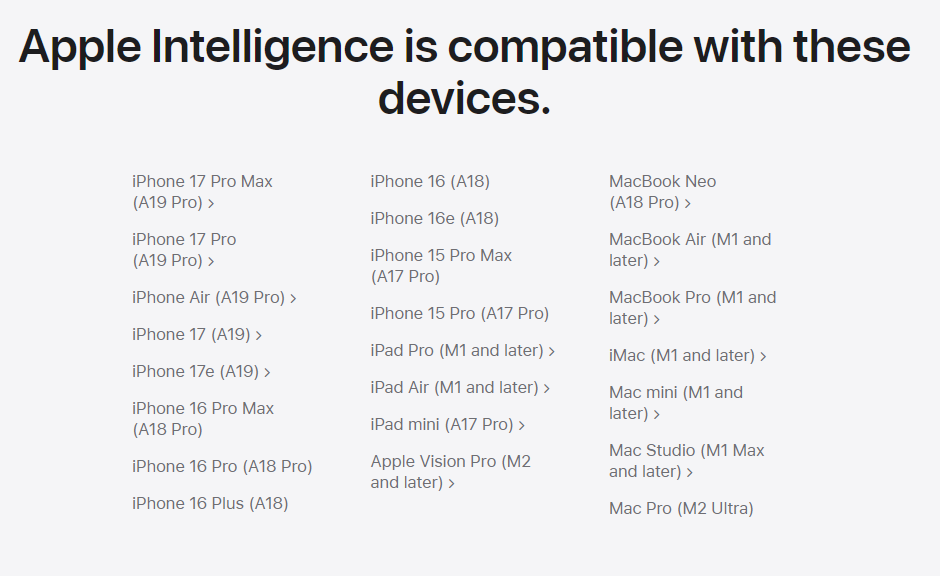
Photo: Apple
More:
Backgrounds in Liquid Glass are generally darker to make text easier to read. A new slider makes the backgrounds fully customizable. This setting applies to all apps. Menu icons are better color-coordinated, as are the icons on the home screens, which are now more recognizable. The design is more responsive and fluid. Apps on iOS and iPadOS launch up to 30% faster, new photos appear 70% faster, and AirDrop transfers are 80% faster. The CPU scheduler manages apps more efficiently based on their current performance needs. This allows the new systems to continue running on the iPhone 11 and iPhone SE (2nd generation). Photos can now also be added to shared iCloud albums from Android devices and Windows PCs. Previously, photos and videos in „Shared Albums“ were not displayed at full resolution. This is now the case.
Developers can now connect Xcode with Figma and GitHub. They can also select their preferred AI model for programming. The Foundation Models will be released under an open-source license later this year, allowing them to be used on other servers and devices as well.
The developer beta is available starting today, and the public beta will be available in July. Tim Cook wraps up the keynote with a few personal words of thanks to the developer community and Apple’s customers.
Bottom line:
Apple finally seems to be able to deliver on its two-year-old promise, introducing AI features that most AI chatbots have already been offering for years. Apple’s advantage lies in providing the AI with significantly better personal context. Furthermore, Apple continues to offer the most privacy-friendly AI on the market. The fact that all new features are being rolled out consistently across all operating systems is an important and necessary step.
90% of the newly introduced features are AI functions. The fact that Apple is not making these available in the European Union is an outrage toward European customers. If Apple is trying to use European customers as a tool to circumvent EU regulations, that cannot be in Apple’s best interest. Given Europe’s efforts toward digital independence, this behavior could backfire on Apple.